

CD, DVD & Blu-ray Data Recovery
Scratched CD, unreadable DVD or degraded Blu-ray? Our Swiss laboratory recovers your data from all optical discs. Free diagnosis within 3 hours.
How to recover data from a damaged CD, DVD or Blu-ray?
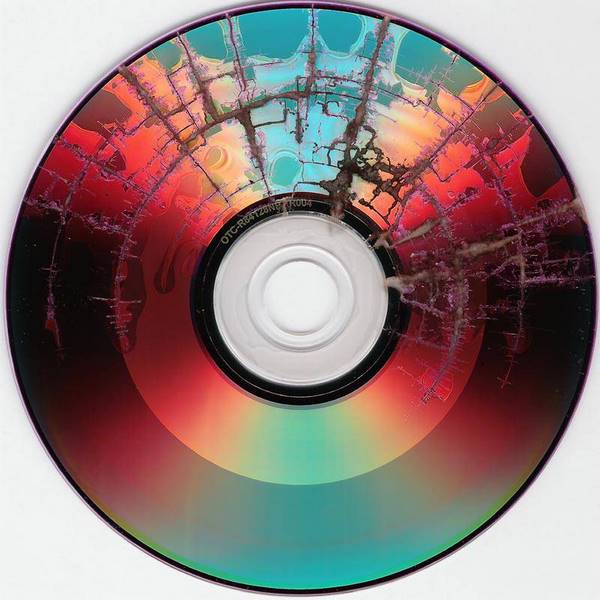
Optical disc data recovery (CD, DVD, HD-DVD, Blu-ray) involves extracting files from a 12 cm reflective disc whose surface is damaged (scratches, delamination, dye degradation or physical fracture) using specialised laser reading equipment.
Optical discs store data as microscopic pits etched in a spiral on a reflective layer. The reading laser distinguishes two states (reflected and non-reflected) to reconstruct the bits. Over time, the organic dye in CD-R and DVD-R media deteriorates: a CD-R has an estimated lifespan of just 5 to 10 years depending on storage conditions.
Since 2006, SOS Data Recovery has processed over 11,300 media for more than 8,000 clients, individuals and businesses alike. Our laboratory in Ins, Switzerland, is equipped with multi-format laser readers capable of re-reading scratched, broken or degraded discs, sector by sector, with advanced error correction.
The cost of optical disc data recovery typically ranges from CHF 40 to 280 depending on the disc type, extent of damage and amount of data to extract. The diagnosis is free with no obligation.
The diagnosis is free and delivered within 3 hours of receipt, and recovery fees are only billed if your data is successfully recovered. SOS Data Recovery is certified CyberSafe and rated 4.8/5 on Avis Vérifiés (296 reviews).
Optical disc comparison
| CD | DVD | Blu-ray | |
|---|---|---|---|
| Capacity | 700 MB | 4.7 GB | 25 GB |
| Track length | ~5.4 km | ~11.8 km | ~27 km |
| Track pitch | 1.6 µm | 0.74 µm | 0.32 µm |
| Laser wavelength | 780 nm (infrared) | 650 nm (red) | 405 nm (blue-violet) |
| Estimated lifespan | 5–10 years (CD-R) | 5–15 years (DVD-R) | 10–20 years (BD-R) |
What are the most common problems with CD, DVD and Blu-ray?
Recognise one of these situations? Contact us for a free diagnosis.
Surface scratches on the disc
Scratches on the reading surface prevent the laser from correctly reading the data. Our specialised equipment can re-read damaged sectors by adjusting the laser power and angle.
Layer separation in the disc
The reflective layer peels away from the polycarbonate substrate, making reading impossible. Our recovery techniques extract the data before the degradation worsens.
Dye degradation (disc rot)
Over time, the organic dye in CD-R and DVD-R media deteriorates, causing increasing read errors. Rapid intervention is essential to save the data before permanent loss.
Cracked or broken disc
A disc broken into several pieces may seem unrecoverable. Our laboratory has the techniques to read the fragments and reconstruct the data sector by sector.
Unreadable or corrupted sectors
The reader can no longer access certain areas of the disc. Our advanced reading tools perform multiple passes with error correction to recover as much data as possible.
Unrecognised format or unfinalised session
A disc burned in a proprietary format or with an unfinalised session may be unreadable on a standard reader. We support all formats and burning sessions.
How does data recovery work?
From free diagnosis to secure delivery: a transparent 4-step process, entirely performed in our Swiss laboratory.
Free diagnosis within 3 hours
Send your media by secure post, drop it at one of our 30 collection points across Switzerland, or bring it directly to our laboratory in Ins. Our team performs a full analysis within 3 hours of receipt, free and with no commitment.
Transparent quote before any work
You receive a detailed quote outlining the type of failure, recovery chances and exact cost. You approve before any work begins. Full payment on success; only attempt costs are charged if recovery fails.
Recovery under ISO 5 laminar flow
Our technicians work under ISO 5 certified laminar flow with specialised tools (PC-3000). Your data never leaves our CyberSafe-certified and CyberSafe partner Swiss laboratory. Duration: 2 to 10 business days depending on complexity.
Secure delivery of your data
Your recovered data is delivered on a new encrypted drive, or via secure download according to your preference. Original media can be destroyed on request to guarantee confidentiality.
Frequently asked questions
Our specialists answer the most common questions.
Broken CD/DVD: What to do to recover your data?
Symptoms of a physically broken CD/DVD
A broken CD/DVD is an optical disc whose physical integrity is compromised, making standard reading impossible. If your CD/DVD is physically broken, do not attempt to glue the pieces back together: this action risks permanently preventing any data recovery. Likewise, do not solder the fragments together and do not try to read the disc by taping the pieces together — these attempts irreparably worsen the damage.
Why are these actions dangerous?
Any incorrect handling of a broken disc can destroy the reflective layer where the data is engraved, reducing the chances of recovery to zero, even by a professional.
What to do immediately with a broken CD/DVD?
- Gather all the fragments — Carefully recover each piece, without handling them unnecessarily.
- Place them in the same protective sleeve — Keep all the pieces together to facilitate the intervention of a specialist.
- Consult a data recovery expert — In some cases, it is technically possible to recover data from a broken disc, but this result is not guaranteed and depends on the extent of the damage.
Key takeaway: The more you intervene on the disc yourself, the more you reduce the chances of success of a professional recovery. Quickly entrust all the fragments to a specialist in optical data recovery.
CD/DVD Difficult to Access
Symptoms
A CD/DVD that is difficult to access is an optical disc that your computer cannot read correctly, either due to physical degradation of the disc surface or failure of the optical drive itself. According to data from the Library of Congress, a CD/DVD can degrade in 2 to 25 years depending on storage conditions.
Main Causes
- Degradation of the disc surface: scratches, oxidation, or delamination of the reflective layer
- Optical drive failure: worn laser, dirty lens, or defective mechanics
- Format incompatibility: the drive does not support the recorded format (DVD-R, DVD+R, etc.)
Recommended diagnostic steps:
- Test the disc on another computer — If the CD/DVD works elsewhere, the problem is with your optical drive and not the disc itself.
- Clean the disc — Gently wipe from the inside out with a clean, dry microfiber cloth.
- Contact a data recovery specialist — If the disc is unreadable on multiple devices, a professional has specialized tools to extract the data. Depending on the case, the recovery rate can reach 70 to 90% of the data.
Preventive tip: Systematically back up your important CDs/DVDs to a digital medium (external hard drive, cloud) to avoid any definitive loss linked to the physical degradation of the disc.
If you encounter a problem with your CD/DVD, do not perform the following actions:
A faulty CD/DVD can present two types of failure: physical (scratches, deposits, delamination) or software (data corruption, burning error). In both cases, any non-professional handling increases the risk of permanent data loss. According to our data recovery specialists, each attempt at amateur repair reduces the chances of subsequent recovery by a professional by 30 to 60%.
If your CD/DVD is no longer recognized by your drive, start by gently cleaning the surface with a non-linting microfiber cloth, wiping from the center outwards (never in a circular motion). This method eliminates 80% of reading problems related to dust or fingerprints, without risking damage to the data.
Scratched CD/DVD
Symptoms
A scratched CD/DVD is an optical disc whose reading surface is damaged by scratches, compromising the drive's ability to read the data correctly. It is essential not to cause further scratches: stop using your CD/DVD immediately and gently remove it from the drive.
When a CD/DVD is scratched, it is often possible to recover the data it contains, provided that the surface is not too degraded. Follow these steps to maximize your chances of recovery:
- Protect the disc – Immediately place your CD/DVD in a suitable protective sleeve to prevent further scratches.
- Do not wipe dry – If the disc is dirty, wipe it from the center to the edge with a slightly damp microfiber cloth, without circular movements.
- Consult a specialist – Take the disc to a professional in optical data recovery, who has suitable polishing and reading tools.
Key takeaway: The more you handle a scratched CD/DVD, the more likely you are to worsen the damage and make recovery impossible. Act quickly and with caution.
Symptoms of a physically broken CD/DVD
A broken CD/DVD is an optical disc whose physical integrity is compromised, making standard reading impossible. If your CD/DVD is physically broken, do not attempt to glue the pieces back together: this action risks permanently preventing any data recovery. Likewise, do not solder the fragments together and do not try to read the disc by taping the pieces together — these attempts irreparably worsen the damage.
Why are these actions dangerous?
Any incorrect handling of a broken disc can destroy the reflective layer where the data is engraved, reducing the chances of recovery to zero, even by a professional.
What to do immediately with a broken CD/DVD?
- Gather all the fragments — Carefully recover each piece, without handling them unnecessarily.
- Place them in the same protective sleeve — Keep all the pieces together to facilitate the intervention of a specialist.
- Consult a data recovery expert — In some cases, it is technically possible to recover data from a broken disc, but this result is not guaranteed and depends on the extent of the damage.
Key takeaway: The more you intervene on the disc yourself, the more you reduce the chances of success of a professional recovery. Quickly entrust all the fragments to a specialist in optical data recovery.
Symptoms
A CD/DVD that is difficult to access is an optical disc that your computer cannot read correctly, either due to physical degradation of the disc surface or failure of the optical drive itself. According to data from the Library of Congress, a CD/DVD can degrade in 2 to 25 years depending on storage conditions.
Main Causes
- Degradation of the disc surface: scratches, oxidation, or delamination of the reflective layer
- Optical drive failure: worn laser, dirty lens, or defective mechanics
- Format incompatibility: the drive does not support the recorded format (DVD-R, DVD+R, etc.)
Recommended diagnostic steps:
- Test the disc on another computer — If the CD/DVD works elsewhere, the problem is with your optical drive and not the disc itself.
- Clean the disc — Gently wipe from the inside out with a clean, dry microfiber cloth.
- Contact a data recovery specialist — If the disc is unreadable on multiple devices, a professional has specialized tools to extract the data. Depending on the case, the recovery rate can reach 70 to 90% of the data.
Preventive tip: Systematically back up your important CDs/DVDs to a digital medium (external hard drive, cloud) to avoid any definitive loss linked to the physical degradation of the disc.
A faulty CD/DVD can present two types of failure: physical (scratches, deposits, delamination) or software (data corruption, burning error). In both cases, any non-professional handling increases the risk of permanent data loss. According to our data recovery specialists, each attempt at amateur repair reduces the chances of subsequent recovery by a professional by 30 to 60%.
If your CD/DVD is no longer recognized by your drive, start by gently cleaning the surface with a non-linting microfiber cloth, wiping from the center outwards (never in a circular motion). This method eliminates 80% of reading problems related to dust or fingerprints, without risking damage to the data.
Symptoms
A scratched CD/DVD is an optical disc whose reading surface is damaged by scratches, compromising the drive's ability to read the data correctly. It is essential not to cause further scratches: stop using your CD/DVD immediately and gently remove it from the drive.
When a CD/DVD is scratched, it is often possible to recover the data it contains, provided that the surface is not too degraded. Follow these steps to maximize your chances of recovery:
- Protect the disc – Immediately place your CD/DVD in a suitable protective sleeve to prevent further scratches.
- Do not wipe dry – If the disc is dirty, wipe it from the center to the edge with a slightly damp microfiber cloth, without circular movements.
- Consult a specialist – Take the disc to a professional in optical data recovery, who has suitable polishing and reading tools.
Key takeaway: The more you handle a scratched CD/DVD, the more likely you are to worsen the damage and make recovery impossible. Act quickly and with caution.