
Blog — Data Recovery and Cybersecurity
Technical analyses, prevention tips and data recovery news from the experts at SOS Data Recovery, Swiss laboratory since 2006.

Understanding RAID Systems: A Comprehensive Guide to RAID 0, 1, 5, 6, and JBOD
A RAID (Redundant Array of Independent Disks) system is a storage virtualization technology that groups multiple independent physical disks into a single logical volume. Introduced in 1987, RAID addresses two fundamental objectives: increasing available storage capacity and improving tolerance to hardware failures.
What is Storage Virtualization?
Storage virtualization is a computing concept introduced in 1987 that involves combining multiple physical media to form a single logical storage volume. Originally, the goal was economic: to obtain more capacity at a lower cost, as hard drives in the 1990s were significantly more expensive than they are today.
Why Simple Virtualization is Insufficient
In its initial form, virtualization distributed data in small blocks across two disks simultaneously. This approach had a critical flaw: the failure of a single disk resulted in the loss of all data, as each file was fragmented across both media. The risk of data loss was therefore multiplied compared to a single disk.
Redundancy: The Heart of RAID
To solve this reliability problem, redundancy techniques were developed, giving rise to true RAID systems—"Redundant Array of Independent Disks." An authentic RAID system tolerates the failure of one or more media without service interruption or data loss.
How to Create a RAID System?
There are three implementation methods, with different levels of performance and cost:
| RAID Type | Operation | Recommended Use Case |
|---|---|---|
| Software RAID | Managed by the operating system (e.g., Windows). The configuration is lost if the OS is reinstalled. | Home use, limited budget |
| Pseudo-Hardware RAID | Managed by the SATA controller integrated into the motherboard. Non-dedicated, limited performance. | Semi-professional use |
| Hardware RAID | Dedicated card with its own processor. Optimal performance, independent of the OS. | Servers, critical environments |
The Concept of Block Size
The block size (expressed in kilobytes) defines the granularity of data segmentation on the disks. Concrete example with a 2-disk RAID and 64 KB blocks: a 192 KB file will be divided into 3 blocks of 64 KB, distributed alternately on the two disks. If one of the disks fails, half of the blocks are lost—and the file becomes unrecoverable.
Comparison of RAID Levels
| Level | Minimum Disks | Redundancy | Usable Capacity | Speed | Ideal For |
|---|---|---|---|---|---|
| JBOD | 2 | ❌ None | 100% (cumulative) | Normal | Simple extension |
| RAID 0 | 2 | ❌ None | 100% (cumulative) | ⚡ Very high | Pure performance |
| RAID 1 | 2 | ✅ 1 disk | 50% | Normal | Maximum security |
| RAID 5 | 3 | ✅ 1 disk | (n–1) × min. capacity | ⚡ High | Servers, NAS |
| RAID 6 | 4 | ✅ 2 disks | (n–2) × min. capacity | ⚡ High | Critical storage |
JBOD
 |
JBOD (Just a Bunch Of Disks) is a sequential virtual stacking of disks with heterogeneous capacities. Data fills the first disk, then the second, and so on. If a disk fails, only the data on that disk is lost—the others remain accessible. Advantage: maximum flexibility, no constraint of identical capacity between disks. |
RAID 0—Performance Without Protection
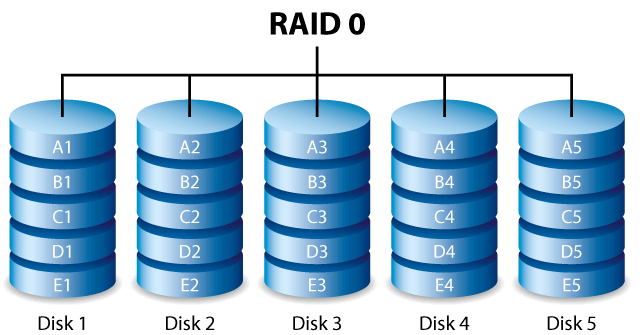 |
RAID 0 distributes data in blocks across all disks simultaneously (a technique called "striping"). With 2 disks, the read and write speed is theoretically doubled. The total capacity corresponds to the sum of all disks—no space is lost for redundancy. Critical disadvantage: the failure of a single disk results in the loss of all data. RAID 0 is not a true RAID in the sense of redundancy. Avoid for any storage of important data. |
RAID 1—The Mirror
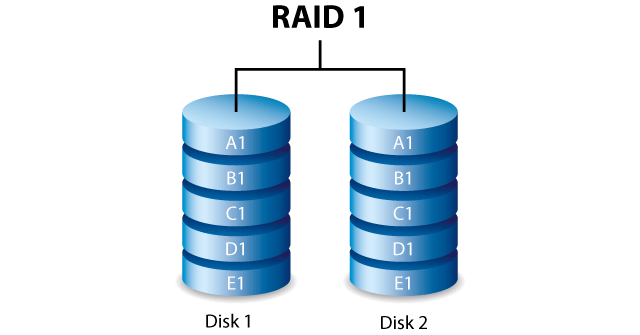 |
RAID 1 simultaneously writes identical data to each disk (minimum 2). If one disk fails, the other contains a perfect and complete copy—service continuity is immediate. Cost of security: with 2 disks of 1 TB, the usable capacity is 1 TB (50% lost for the mirror). No speed gain in writing. It is the RAID level offering the best protection, but the worst capacity/cost ratio. |
Parity: Fundamental Principle of RAID 5 and RAID 6
Parity is the result of a logical calculation (XOR operation) applied to the data blocks of the different disks. Simple analogy: if 5 + 8 = 13, then "13" is the parity. If a disk fails, the missing blocks are recalculated from the remaining blocks and the parity—like solving the equation 5 + X = 13 (X = 8). Parity is distributed across all disks according to a rotating algorithm.
RAID 5—The Performance / Security Balance
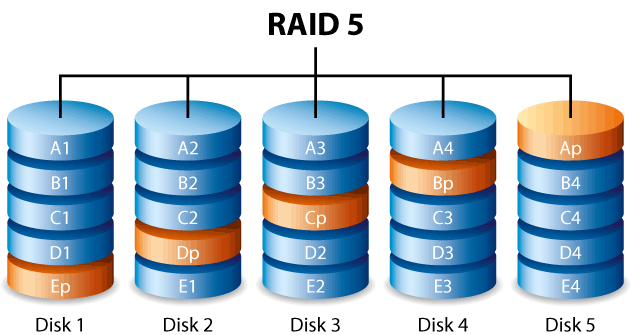 |
RAID 5 combines the striping of RAID 0 and distributed parity. A minimum of 3 disks of identical capacity is required. The usable capacity is calculated as follows: Usable capacity = (number of disks − 1) × capacity of the smallest disk Example: 3 disks of 1,000 GB → 2,000 GB usable. With 16 disks of 1,000 GB → 15,000 GB usable. RAID 5 tolerates the failure of one disk. It is the most deployed RAID level in servers and NAS, thanks to its excellent compromise between capacity, speed, and security. |
RAID 6—Double Parity for Critical Environments
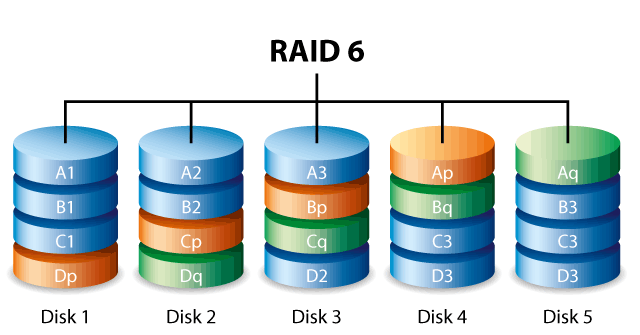 |
RAID 6 extends RAID 5 by adding a second parity calculated by the Reed-Solomon code. A minimum of 4 disks is required. The usable capacity is: Usable capacity = (number of disks − 2) × capacity of the smallest disk Example: 16 disks of 1,000 GB → 14,000 GB usable (compared to 15,000 GB in RAID 5). RAID 6 tolerates the simultaneous failure of two disks, which makes it essential for large capacity arrays where the probability of multiple failures is statistically significant. |
FAQ—Frequently Asked Questions About RAID Systems
Which RAID level to choose for a home NAS?
For a 2-bay NAS, RAID 1 (mirror) is recommended for its simplicity and maximum protection. From 3 bays, RAID 5 offers a better capacity/security ratio. For critical use with 4 bays or more, prefer RAID 6.
Does RAID replace a backup?
No. RAID protects against hardware failure of a disk, but not against accidental deletion, ransomware attacks, software errors, or physical disasters (fire, flood). A 3-2-1 backup strategy remains essential in addition.
Can you create a RAID with SSDs?
Yes. RAID principles apply to any type of media: hard drives (SATA, SCSI, SAS), SSDs, or even USB drives. SSDs in RAID 0 offer particularly high input/output performance.
What happens if you reinstall Windows on a software RAID?
The software RAID configuration is managed by the OS. Reinstalling Windows causes the loss of the RAID configuration. To avoid this risk, opt for a hardware or pseudo-hardware RAID, whose configuration is stored independently of the OS.
Conclusion
The choice of a RAID level depends on three criteria to balance: usable capacity, speed, and fault tolerance. RAID 0 should be avoided for any storage of important data due to the total lack of redundancy. RAID 5 represents the best compromise for the majority of servers and NAS. RAID 6 is essential as soon as service continuity is critical and the disk fleet is large. In all cases, a RAID system must be supplemented by a regular external backup policy.